KBX TM 모바일 계좌 요청

KBX TM Mobile은 운송업체와 운전자가 클릭 세 번으로 간편하게 화물을 계속 이동하고 모든 사람에게 최신 정보를 제공할 수 있는 방법을 제공합니다. 이 앱은 TMS와 원활하게 작동하여 상태 업데이트를 자동화하고 POD 업로드를 간소화하므로 전화 통화 시간을 줄이고 도로에서 더 많은 시간을 보낼 수 있습니다.

Is KBX TM Mobile Right for You?

We recommend the app for carriers who:

  • Have drivers with location-enabled smartphones (iOS or Android)
  • Can train drivers on the three-click update process
  • Can receive dispatch texts and/or download the app
  • Can handle EDI or manual tender and invoicing processes

시작하기

  • Driver Login: Drivers log in and search for their assigned load before pickup.
  • Carrier (Dispatch) Login: Dispatch logs into KBX’s TMS, enters the driver’s load number and phone number. The driver receives a text with a link that opens the app with load details pre-loaded.

1단계 – 계정 등록

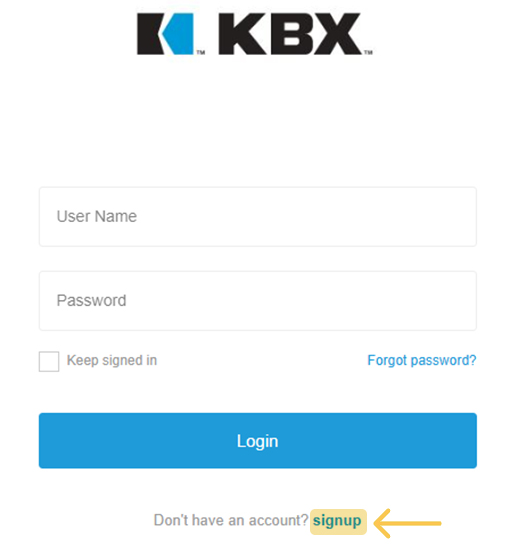
여기에서 가입하기 버튼을 클릭하고 양식을 작성합니다: 이름, 성, 회사명, 사용자 아이디 (시스템에서 고유해야 함), 이메일, 비밀번호를 입력합니다.

Signup step

2단계 – 애플리케이션 선택

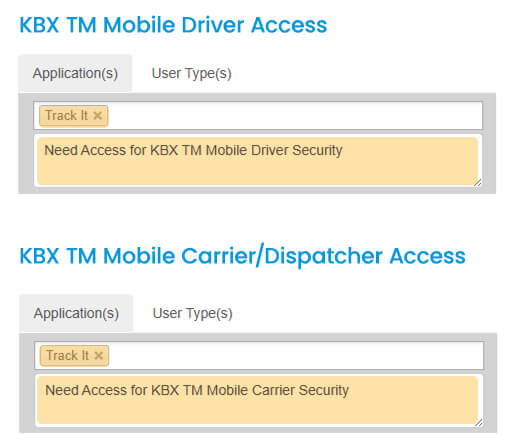
애플리케이션 옵션에서 트래킹을 선택합니다. 액세스 요구 사항을 명확히 하기 위해 메모를 추가합니다(예시 이미지 참조).

Step 2 process

3단계 – 사용자 유형 선택

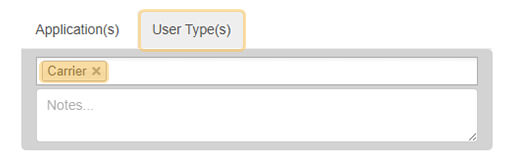
사용자 유형 탭으로 이동하여 드롭다운 메뉴에서 이동 통신사를 선택합니다.

User Type step

Step 4 – Review and Confirm

  • Read and accept the Terms & Conditions.
  • Click Register.
  • Check your inbox for a confirmation email and verify your address, you won’t be able to log in until it’s confirmed.
  • Once verified, our KBX TM Admin Team will grant you the appropriate security access or reach out for any additional details needed to complete your setup


Shipping containers Shipping

질문이 있으신가요?