KBX TMモバイル口座リクエスト

KBX TM Mobileは輸送業者とドライバーに3クリックの簡単な操作で貨物の輸送を継続し、すべての人に情報を提供します。このアプリはTMSとシームレスに連動し、ステータスの更新を自動化し、PODのアップロードを簡素化します。

Is KBX TM Mobile Right for You?

We recommend the app for carriers who:

  • Have drivers with location-enabled smartphones (iOS or Android)
  • Can train drivers on the three-click update process
  • Can receive dispatch texts and/or download the app
  • Can handle EDI or manual tender and invoicing processes

はじめに

  • Driver Login: Drivers log in and search for their assigned load before pickup.
  • Carrier (Dispatch) Login: Dispatch logs into KBX’s TMS, enters the driver’s load number and phone number. The driver receives a text with a link that opens the app with load details pre-loaded.

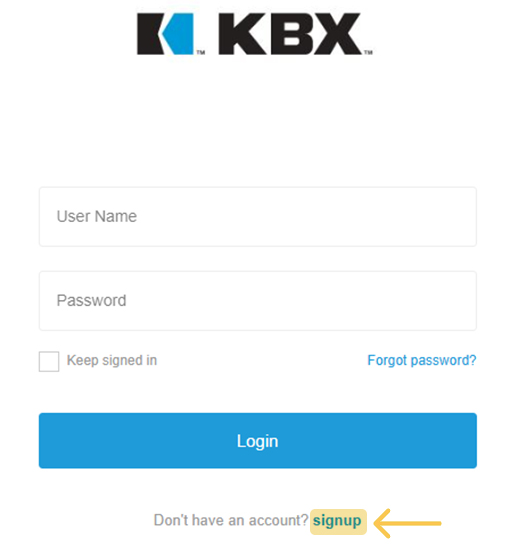
ステップ1 – アカウントの登録

サインアップはこちら」ボタンをクリックし、フォームに必要事項を入力してください:姓、名、会社名、ユーザーID(弊社システム内で一意である必要があります)、Eメール、パスワード。

Signup step

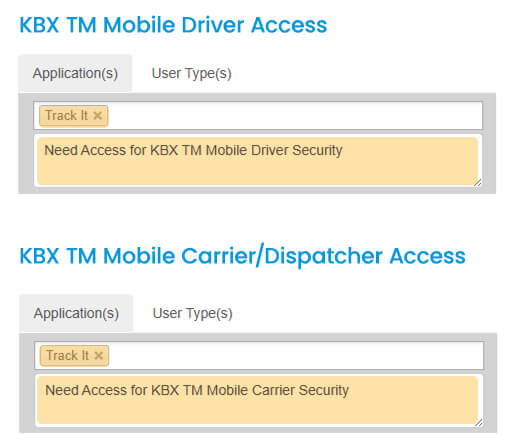
ステップ2 – アプリケーションの選択

アプリケーションのオプションからTrack Itを選択します。 アクセスの必要性を明確にするためのメモを追加してください(画像の例を参照)。

Step 2 process

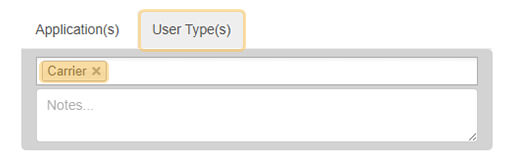
ステップ3 – ユーザータイプを選択する

ユーザータイプ]タブに移動し、ドロップダウンメニューから[キャリア]を選択します。

User Type step

Step 4 – Review and Confirm

  • Read and accept the Terms & Conditions.
  • Click Register.
  • Check your inbox for a confirmation email and verify your address, you won’t be able to log in until it’s confirmed.
  • Once verified, our KBX TM Admin Team will grant you the appropriate security access or reach out for any additional details needed to complete your setup